Troubleshooting
This list is not extensive, but includes the most common issues users encounter, or questions that come up frequently.
Please visit the M3U Editor Discord for further help.
Common issues
Error downloading Playlist or EPG file
If you're receiving the following error:
Error processing "PLAYLIST NAME": cURL error 56: Recv failure: Connection reset by peer
this is a provider error and not something we can fix. Your best bet is to try and load the playlist file directly in your browser. If you are successful, you can try and use the same User Agent string on the Playlist/EPG as your browser
you can get your user agent string here: https://dnschecker.org/user-agent-info.php
Error syncing M3U Playlist
Most common error: Error processing "PLAYLIST NAME": Invalid EXTINF format: Check for additional/invalid characters, or spaces around commas, etc.
this means that there was an issue processing a line in your provided m3u file or URL
a normal line should look like this:
#EXTINF:-1 tvg-id="id" tvg-name="Name" tvg-logo="https://website.com/logo.png" group-title="Group",Title
FAQs
Why do all routes point to m3u editor, even when the proxy is disabled
We route all channels/series/etc. through m3u editor, so you will see URLs in the format of: http://m3ueditor-url.example/live/user/pass/stream_id.m3u8, or http://m3ueditor-url.example/movies/user/pass/stream_id.m3u8, etc.
When a player requests one of these streams, m3u editor will determine if the proxy is enabled, and if so, proxy the stream. If the proxy is NOT enabled, then we simply send a redirect to the original stream
There has been some confusion about the URLs with the proxy disabled. This is the intended function, and streams will not be proxied unless enabled
In-app player is not working
Due to browser playback limitations, most streams (with the exception of a few providers) will need to be transcoded to work in the in-app player
How to transcode streams
- Create a Stream Profile: Navigate to Stream Profiles and press the Generate Default Profiles button
- Go to Settings > Proxy and select a profile for the Default Transcoding Profile
- (optional) if VOD content does not play in the in-app player, you may also need to assign a stream profile for VOD content as well
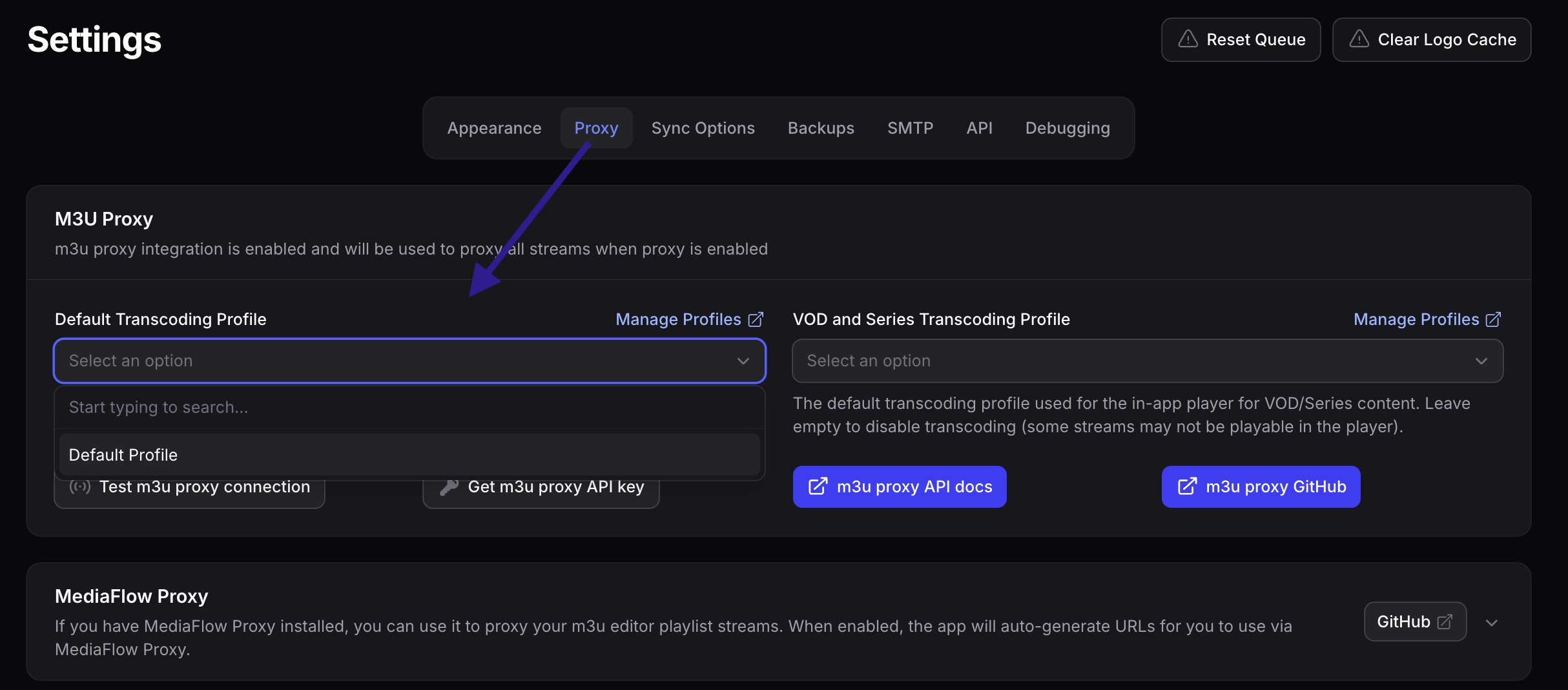
the transcoding profiles set in Settings > Proxy will be used for the in-app player only – you must assign transcoding profiles to each Playlist to transcode the streams for that Playlist (Edit Playlist and adjust settings under the Output tabs Streaming Output section)
when using a Stream Profile (transcoding) for VOD/Series content you will lose the ability to time seek. You can, however, use the proxy in direct mode and time seek will work. Only transcoding will prevent time seeking for the stream as it turns into a live-transcoded stream.