Plex Integration
These instructions assume you have a working Plex Media Server (PMS)
You will need to make sure you have your URL for your Plex Server. This can be in the form of an IP address or FQDN (DNS). To facilitate the integration, you will need to obtain your Plex authentication token (X-Plex-Token).
Obtain Your Plex Token
Unlike Emby and Jellyfin which use API keys generated from the dashboard, Plex uses an authentication token. There are several ways to find your Plex token:
Method 1: From Plex Web App (Recommended)
- Sign into the Plex Web App
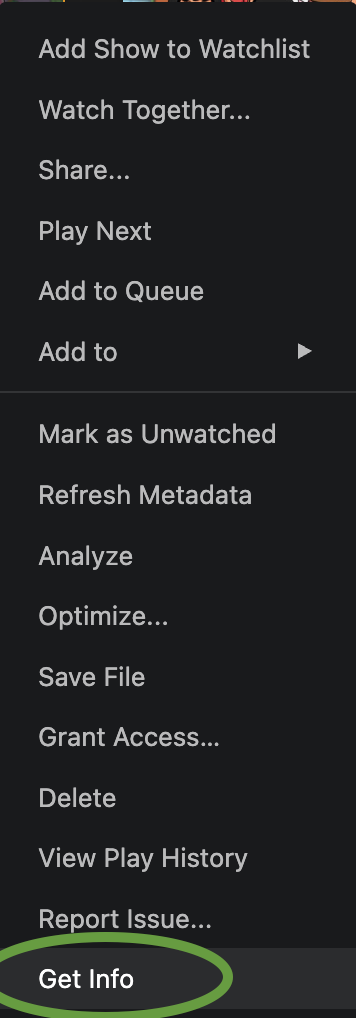
- Browse to any item in your library and click the three-dot menu and select Get Info
- Click View XML at the bottom left of the window that appears
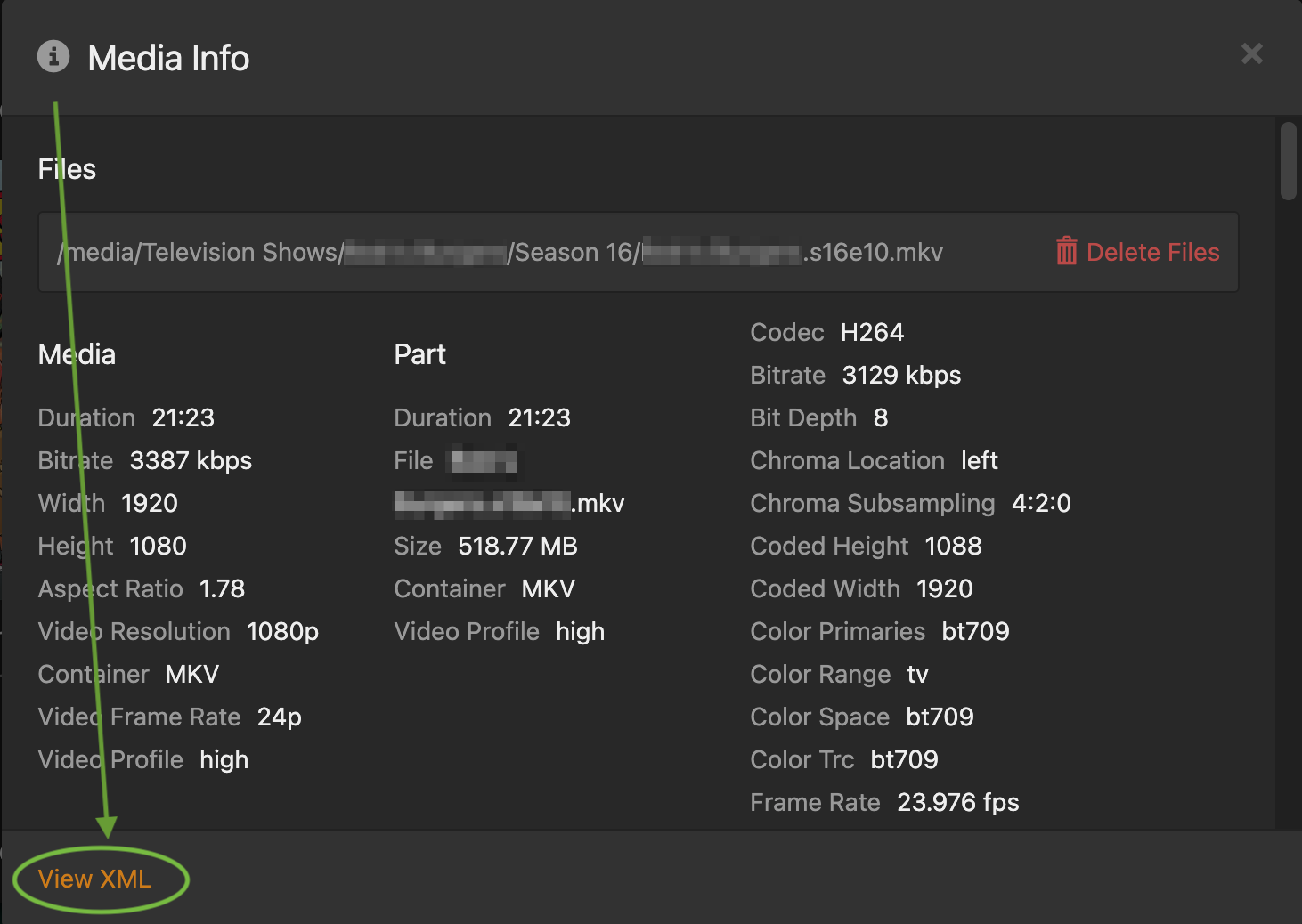
- In the new browser tab, look at the URL - your token is the value after
X-Plex-Token=

Method 2: From Plex Account Page
- Go to plex.tv/devices.xml while signed in
- Your token will be visible in the XML data as
token="YOUR_TOKEN_HERE"
Your Plex token grants full access to your server. Never share it publicly or commit it to version control.
🛠️ Configure the Integration
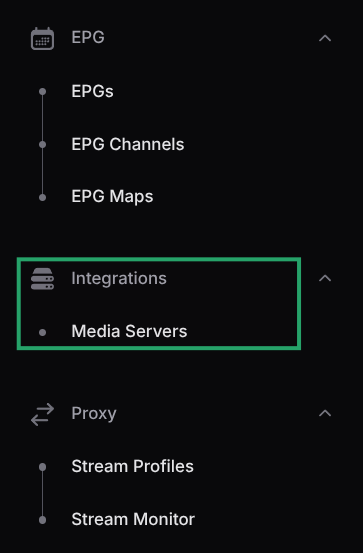
- In M3U-Editor expand the sidebar (left side), locate the integrations section and select Media Servers
-
Click Add Media Server
-
Fill in the details:
- Display Name: A friendly name for your server (e.g., "My Plex Server")
- Server Type: Select Plex from the dropdown
- Host / IP Address: Your Plex server address (e.g.,
192.168.1.100orplex.example.com) - Port: The default Plex port is
32400 - Use HTTPS: Enable if your server uses SSL/TLS
- API Key/Token: Paste your Plex token obtained above
-
Click Test Connection & Discover Libraries to verify the connection and discover available libraries
-
Select which libraries you want to import (Movies and/or TV Shows)
-
Click Create to save the integration
Your media server should now be displayed under the Media Servers integrations. The integration will automatically sync your Plex content based on your configured schedule.
What Gets Synced
When you sync your Plex server, M3U Editor imports:
- Movies: All movies from selected libraries, including metadata (title, year, genre, rating, overview, cast, poster art)
- TV Series: Complete series with seasons and episodes, including all associated metadata
- Artwork: Posters and backdrop images are proxied through M3U-Editor to protect your token
The sync process respects your library selection and genre handling settings. For large libraries, the initial sync may take several minutes.
Plex Management
The Plex Management tab is exclusively available for Plex Media Server integrations and gives you direct control over your Plex server from within M3U-Editor, without needing to switch back and forth between apps.
The Plex Management tab only appears on existing Plex integrations (not during initial creation) and is hidden for all other media server types.
Enabling Plex Management
Open your Plex integration, navigate to the Plex Management tab, and toggle on Enable Plex Management. Once enabled, the management panels expand below.
Once enabled, two status indicators are shown at the top:
| Indicator | What it shows |
|---|---|
| Server Info | Plex server name, version, and platform |
| DVR Sync Status | Whether registered tuner(s) and EPG are in sync with the Plex server |
DVR / Live TV Tuner
This section lets you register one or more playlists as HDHomeRun (HDHR) tuners in Plex, enabling Live TV & DVR functionality. Each playlist becomes a separate virtual tuner.
Register a Tuner
Click Register DVR Tuner in Plex (or Add Tuner if one is already registered) and fill in the form:
| Field | Description |
|---|---|
| Playlist | The M3U-Editor playlist to expose as a tuner. Supports regular, custom, and merged playlists. |
| HDHR Base URL | The URL Plex uses to reach the HDHR emulation endpoint (e.g. http://192.168.1.100:36400/{uuid}/hdhr). Must be reachable from the Plex server. Use your LAN IP, not localhost. |
| EPG URL | The XMLTV guide URL for this playlist (e.g. http://192.168.1.100:36400/{uuid}/epg.xml). Must also be reachable from Plex. |
| Country Code | ISO country code for the DVR guide (e.g. us, de, gb). |
| Language Code | ISO language code (e.g. en, de, fr). |
For EPG channel matching to work correctly in Plex, the selected playlist's Preferred TVG ID output must be set to Channel Number. M3U-Editor will warn you if this is not the case when you select the playlist.
After registration, the tuner appears in the Registered Tuners table showing the playlist name and internal device key.
Manage Registered Tuners
Once tuners are registered, additional actions become available:
| Action | Description |
|---|---|
| Remove Tuner | Removes a single tuner from Plex. If it is the last tuner, the entire DVR is also removed. |
| Remove Entire DVR | Removes the DVR and all registered tuners from Plex. Live TV & DVR will stop working until you re-register. |
| Refresh EPG Guide | Triggers Plex to re-fetch the EPG guide data and configures automatic guide refreshes. Use this after updating your XMLTV source. |
| Force Sync Channels | Pushes the current channel list from M3U-Editor to Plex. Run this after adding or removing channels to keep Plex in sync. |
Libraries & Scanning
Displays all Plex libraries with their type (movie/show) and current scan status. Libraries that are currently being scanned show a Scanning... indicator.
Scan All Libraries
Triggers a full scan of every library on the Plex server. Plex will look for new or changed files in all library folders. A notification confirms when the scan has been initiated.
Recordings / DVR Subscriptions
Lists all scheduled DVR recording subscriptions configured in Plex, showing the title, type, and creation date of each subscription. This is a read-only view; manage recordings from the Plex interface itself.
Tips & Troubleshooting
- Plex can't reach the HDHR URL: Make sure M3U-Editor is accessible from the Plex server's network. Use your machine's LAN IP address rather than
localhostor127.0.0.1. - EPG not matching channels: Ensure the playlist's Preferred TVG ID output is set to Channel Number and run Force Sync Channels after saving the change.
- DVR Sync Status shows a warning: Click Force Sync Channels to re-push the channel map to Plex.
- Server Info shows "Connection failed": Verify your Plex token is still valid and the server URL/port is correct in the Connection tab.